HeavyEdge documentation#

Basic package to analyze coating profile data with “heavy edge”.
Usage#
HeavyEdge is designed to be used either as a command line program or as a Python module.
Command line#
Command line interface provides pre-defined subroutines to handle profile data files. It can be invoked by:
heavyedge <command>
Refer to help message of heavyedge for list of commands and their arguments.
The command line interface defines specific file formats. Refer to Data file API section for detailed information.
Analysis parameters#
Some analysis parameters can be passed by a configuration file in YAML forma.
If a command takes such parameters, it always has an optional --config argument.
The --config argument takes a path to config file where the parameters can be specified.
Explicitly passed values take precedence over configuration file.
Python module#
The Python module heavyedge provides functions and classes for Python runtime.
Refer to Runtime API section for high-level interface.
Module reference#
This section provides reference for heavyedge Python module.
Runtime API#
High-level Python runtime interface.
- heavyedge.api.prep(raw_file, sigma, std_thres, fill_value=0.0, z_thres=None, batch_size=None, logger=<function <lambda>>)[source]#
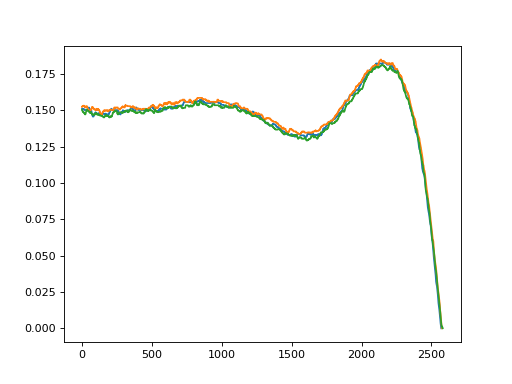
Preprocess raw profiles in the given file.
- Parameters:
- raw_fileheavyedge.RawProfileBase
Opened raw profile file.
- sigmascalar
Standard deviation of Gaussian filter for smoothing.
- std_thresscalar
Standard deviation threshold to detect contact point.
- fill_valuescalar, default=0.0
Value to fill after the contact point. If None, does not fill the array.
- z_thresscalar, optional
Z-score threshold to detect outliers. If not passed, outlier detection is not performed.
- batch_sizeint, optional
Batch size to load data. If not passed, all data are loaded at once.
- loggercallable, optional
Logger function which accepts a progress message string.
- Yields:
- Y_processed(batch_size, M) array
Preprocessed profiles.
- Ls(batch_size,) array
Lengths of the preprocessed profiles.
- names(batch_size,) array
Names of the preprocessed profiles.
Examples
>>> from heavyedge import get_sample_path, RawProfileCsvs
>>> from heavyedge.api import prep
>>> raw = RawProfileCsvs(get_sample_path("Type3"))
>>> Ys, Ls, _ = next(prep(raw, 32, 0.01, batch_size=3))
>>> import matplotlib.pyplot as plt
... for Y, L in zip(Ys, Ls):
...     plt.plot(Y[:L])
- heavyedge.api.fill(file, fill_value, batch_size=None, logger=<function <lambda>>)[source]#
Fill profiles after the contact point.
- Parameters:
- fileheavyedge.ProfileData
Open h5 file.
- fill_valuescalar
Value to fill after the contact point.
- batch_sizeint, optional
Batch size to load data. If not passed, all data are loaded at once.
- loggercallable, optional
Logger function which accepts a progress message string.
- Yields:
- Ys(batch_size, M) array
Filled profiles.
- Ls(batch_size,) array
Lengths of the filled profiles.
- names(batch_size,) array
Names of the filled profiles.
Examples
>>> from heavyedge import get_sample_path, ProfileData
>>> from heavyedge.api import fill
>>> with ProfileData(get_sample_path("Prep-Type1.h5")) as file:
...     Ys, _, _ = file[:]
...     Ys_filled, _, _ = next(fill(file, float("nan")))
>>> import matplotlib.pyplot as plt
... plt.plot(Ys.T, color="gray")
... plt.plot(Ys_filled.T)

- heavyedge.api.mean_euclidean(f, batch_size=None, logger=<function <lambda>>)[source]#
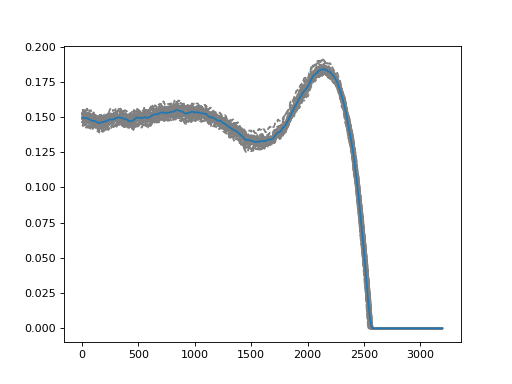
Compute arithmetic mean profile.
- Parameters:
- fheavyedge.ProfileData
Open h5 file of profiles.
- batch_sizeint, optional
Batch size to load data. If not passed, all data are loaded at once.
- loggercallable, optional
Logger function which accepts a progress message string.
- Returns:
- (M,) array
Average profile.
Examples
>>> from heavyedge import get_sample_path, ProfileData
>>> from heavyedge.api import mean_euclidean
>>> with ProfileData(get_sample_path("Prep-Type3.h5")) as f:
...     Ys, _, _ = f[:]
...     mean = mean_euclidean(f, batch_size=5)
>>> import matplotlib.pyplot as plt
... plt.plot(Ys.T, "--", color="gray")
... plt.plot(mean)
- heavyedge.api.mean_wasserstein(f, grid_num, batch_size=None, logger=<function <lambda>>)[source]#
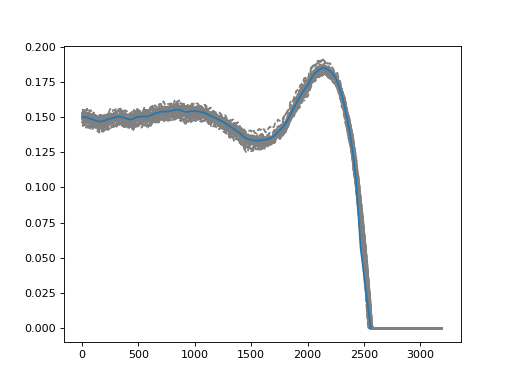
Compute mean profile by Fréchet mean with respect to Wasserstein metric.
- Parameters:
- fheavyedge.ProfileData
Open h5 file of profiles.
- grid_numint
Number of grids to sample quantile functions.
- batch_sizeint, optional
Batch size to load data. If not passed, all data are loaded at once.
- loggercallable, optional
Logger function which accepts a progress message string.
- Returns:
- f_mean(M,) array
Average profile.
- Lint
Length of the support of f_mean.
Notes
This function automatically fills the profiles with zero values after their contact points. In HeavyEdge 2.0, this feature will be removed and f will be required to contain profiles already filled with zero values.
Examples
>>> from heavyedge import get_sample_path, ProfileData
>>> from heavyedge.api import mean_wasserstein
>>> with ProfileData(get_sample_path("Prep-Type3.h5")) as f:
...     Ys, _, _ = f[:]
...     mean, L = mean_wasserstein(f, 100)
>>> import matplotlib.pyplot as plt
... plt.plot(Ys.T, "--", color="gray")
... plt.plot(mean[:L])
- heavyedge.api.scale_area(f, batch_size=None, logger=<function <lambda>>)[source]#
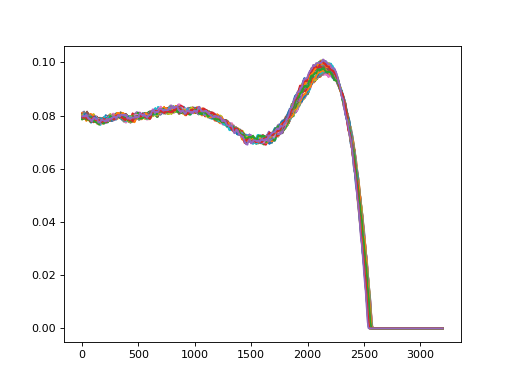
Scale edge profile by area.
- Parameters:
- fheavyedge.ProfileData
Open h5 file of profiles.
- batch_sizeint, optional
Batch size to load data. If not passed, all data are loaded at once.
- loggercallable, optional
Logger function which accepts a progress message string.
- Yields:
- scaled(batch_size, M) array
Scaled edge profile.
- Ls(batch_size,) array
Lengths of the scaled profiles.
- names(batch_size,) array
Names of the scaled profiles.
Examples
>>> import numpy as np
>>> from heavyedge import get_sample_path, ProfileData
>>> from heavyedge.api import scale_area
>>> with ProfileData(get_sample_path("Prep-Type3.h5")) as f:
...     gen = scale_area(f, batch_size=5)
...     Ys = np.concatenate([ys for ys, _, _ in gen], axis=0)
>>> import matplotlib.pyplot as plt
... plt.plot(Ys.T)
- heavyedge.api.scale_plateau(f, batch_size=None, logger=<function <lambda>>)[source]#
Scale edge profile by plateau height.
- Parameters:
- fheavyedge.ProfileData
Open h5 file of profiles.
- batch_sizeint, optional
Batch size to load data. If not passed, all data are loaded at once.
- loggercallable, optional
Logger function which accepts a progress message string.
- Yields:
- scaled(batch_size, M) array
Scaled edge profile.
- Ls(batch_size,) array
Lengths of the scaled profiles.
- names(batch_size,) array
Names of the scaled profiles.
Examples
>>> import numpy as np
>>> from heavyedge import get_sample_path, ProfileData
>>> from heavyedge.api import scale_plateau
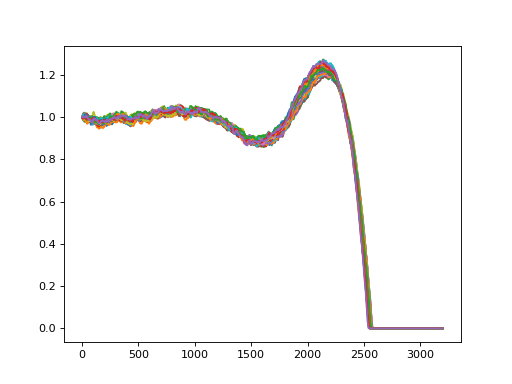
>>> with ProfileData(get_sample_path("Prep-Type3.h5")) as f:
...     gen = scale_plateau(f, batch_size=5)
...     Ys = np.concatenate([ys for ys, _, _ in gen], axis=0)
>>> import matplotlib.pyplot as plt
... plt.plot(Ys.T)
- heavyedge.api.trim(f, width1, width2, batch_size=None, logger=<function <lambda>>)[source]#
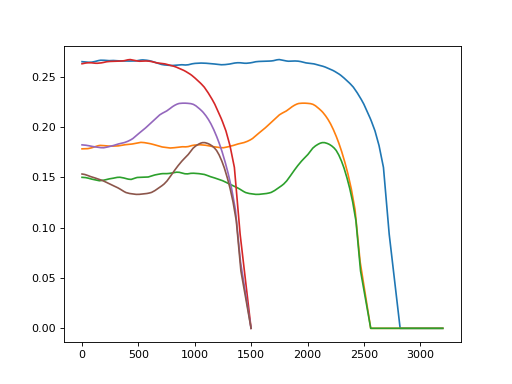
Trim edge profile to a specific width.
This function matches the contact points of all profiles to a same location.
- Parameters:
- fheavyedge.ProfileData
- width1int
Number of points on the left side of the profile.
- width2int
Number of points on the right side of the profile.
- batch_sizeint, optional
Batch size to load data. If not passed, all data are loaded at once.
- loggercallable, optional
Logger function which accepts a progress message string.
- Yields:
- trimmed(batch_size, width) array
Trimmed edge profile.
- Ls(batch_size,) array
Lengths of the scaled profiles.
- names(batch_size,) array
Names of the scaled profiles.
Examples
>>> import numpy as np
>>> from heavyedge import get_sample_path, ProfileData
>>> from heavyedge.api import trim
>>> with ProfileData(get_sample_path("MeanProfiles.h5")) as f:
...     Ys, _, _ = f[:]
...     gen = trim(f, 1500, 0, batch_size=10)
...     Ys_trim = np.concatenate([ys for ys, _, _ in gen], axis=0)
>>> import matplotlib.pyplot as plt
... plt.plot(Ys.T)
... plt.plot(Ys_trim.T)
- heavyedge.api.pad(f, width1, width2, batch_size=None, logger=<function <lambda>>)[source]#
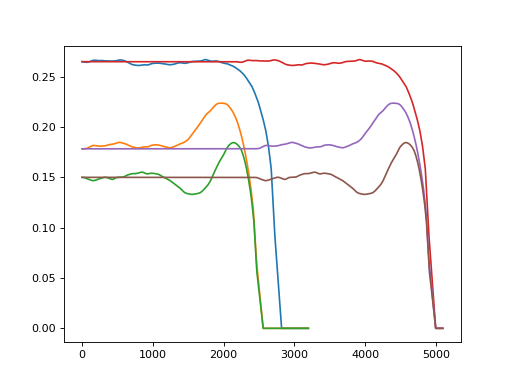
Pad edge profile to a specific width.
- Parameters:
- fheavyedge.ProfileData
- width1int
Number of points on the left side of the profile.
- width2int
Number of points on the right side of the profile.
- batch_sizeint, optional
Batch size to load data. If not passed, all data are loaded at once.
- loggercallable, optional
Logger function which accepts a progress message string.
- Yields:
- padded(batch_size, width) array
Padded edge profile.
- Ls(batch_size,) array
Lengths of the padded profiles.
- names(batch_size,) array
Names of the padded profiles.
Examples
>>> import numpy as np
>>> from heavyedge import get_sample_path, ProfileData
>>> from heavyedge.api import pad
>>> with ProfileData(get_sample_path("MeanProfiles.h5")) as f:
...     Ys, _, _ = f[:]
...     gen = pad(f, 5000, 100, batch_size=10)
...     Ys_pad = np.concatenate([ys for ys, _, _ in gen], axis=0)
>>> import matplotlib.pyplot as plt
... plt.plot(Ys.T)
... plt.plot(Ys_pad.T)
Data file API#
Data file I/O.
- class heavyedge.io.RawProfileBase(path)[source]#
Base class to read raw profile data.
All profiles must have the same length.
Notes
self[key]returns a tuple of profile(s) and profile name(s).
- class heavyedge.io.RawProfileCsvs(path)[source]#
Read raw profile data from a directory containing CSV files.
Directory structure:
rawdata/
├── profile1.csv
├── profile2.csv
└── ...
- Parameters:
- pathpathlike
Path to the directory containing the raw CSV files.
Notes
Each CSV file must contain a single column of numeric values (no header).
The order of profiles is determined by the sorted filenames.
The profile name is derived from the filename stem.
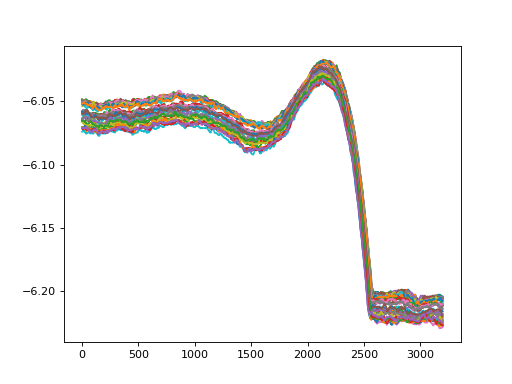
Examples
>>> from heavyedge import get_sample_path, RawProfileCsvs
>>> profiles = RawProfileCsvs(get_sample_path("Type3"))
>>> import matplotlib.pyplot as plt
... for i in range(len(profiles)):
...     profile, _ = profiles[i]
...     plt.plot(profile)
- class heavyedge.io.ProfileData(path, mode='r', **kwargs)[source]#
Preprocessed 1-dimensional profile data as hdf5 file.
- Parameters:
- pathpathlike
Path to the hdf5 file.
- mode{‘r’, ‘w’, ‘r+’, ‘a’, ‘w-‘}
Mode to open the file.
- kwargsdict
Optional arguments passed to
h5py.File.
Notes
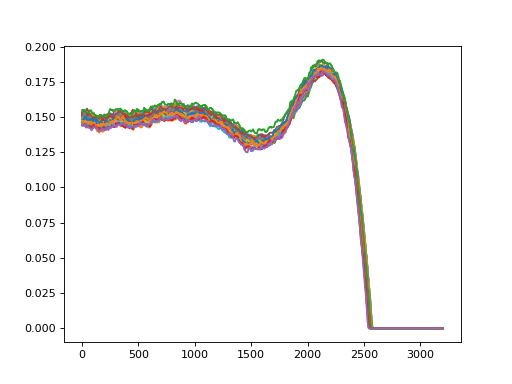
self[key]returns a tuple of full profile data, profile length(s) and profile name(s). Ifkeyis a sequence, it must be sorted in ascending order.Examples
>>> from heavyedge import get_sample_path, ProfileData
>>> with ProfileData(get_sample_path("Prep-Type3.h5")) as data:
...     Ys, _, _ = data[:]
>>> import matplotlib.pyplot as plt
... plt.plot(Ys.T)
- create(M, resolution, name=None)[source]#
Create datasets and write metadata.
- Parameters:
- Mint
Maximum length of profile data.
- resolutionfloat
Spatial resolution of the profile data.
- namestr, optional
Unique name to identify the dataset.
- Returns:
- obj
Returns the object itself.
Low-level API#
Various functions for edge profiles.
- heavyedge.profile.preprocess(Ys, sigma, std_thres)[source]#
Preprocess raw profiles.
- Parameters:
- Ys(N, M) array
Array of N profiles.
- sigmascalar
Standard deviation of Gaussian filter for smoothing.
- std_thresscalar
Standard deviation threshold to detect contact point.
- Returns:
- Ys(N, M) array
Preprocessed profile data.
- Ls(N,) array
Length of Y until the contact point.
Notes
Profiles undergo the following steps:
Profile direction is set so that the contact point is on the right hand side.
Contact point is detected, and set to have zero height.
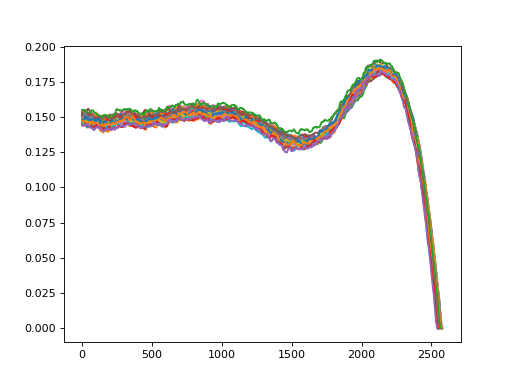
Examples
>>> import numpy as np
>>> from heavyedge import get_sample_path, RawProfileCsvs
>>> from heavyedge.profile import preprocess
>>> raw = RawProfileCsvs(get_sample_path("Type3"))
>>> Ys = np.array([raw[i][0] for i in range(len(raw))])
>>> Ys_processed, Ls = preprocess(Ys, 32, 0.01)
>>> import matplotlib.pyplot as plt
... for Y, L in zip(Ys_processed, Ls):
...     plt.plot(Y[:L])
- heavyedge.profile.fill_after(Ys, Ls, fill_value)[source]#
Fill arrays with a constant value after specified lengths.
The input array Ys is modified.
- Parameters:
- Ys(N, M) array
Array of N profiles.
- Ls(N,) array
Length of each profile.
- fill_valuescalar
Value to fill Ys.
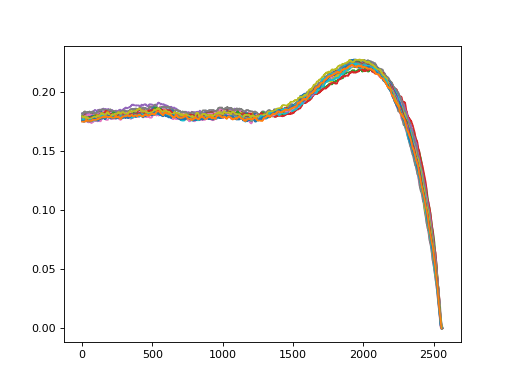
Examples
>>> from heavyedge import get_sample_path, ProfileData
>>> from heavyedge.profile import fill_after
>>> with ProfileData(get_sample_path("Prep-Type2.h5")) as data:
...     x = data.x()
...     Ys, Ls, _ = data[:]
>>> fill_after(Ys, Ls, float("nan"))
>>> import matplotlib.pyplot as plt
... plt.plot(Ys.T)
Wasserstein distance#
Wasserstein-related functions.
- heavyedge.wasserstein.quantile(x, fs, Ls, t)[source]#
Convert probability distributions to quantile functions.
- Parameters:
- x(M1,) ndarray
Coordinates of grids over which fs are measured.
- fs(N, M1) ndarray
Empirical probability density functions. Each function must have zero values after each length in Ls.
- Ls(N,) ndarray
Length of supports of each fs.
- t(M2,) ndarray
Points over which the quantile function will be measured. Must be strictly increasing from 0 to 1.
- Returns:
- (N, M2) ndarray
Quantile functions* over t.
Examples
>>> import numpy as np
>>> from heavyedge import get_sample_path, ProfileData
>>> from heavyedge.wasserstein import quantile
>>> with ProfileData(get_sample_path("Prep-Type2.h5")) as data:
...     x = data.x()
...     Ys, Ls, _ = data[:]
>>> fs = Ys / np.trapezoid(Ys, x, axis=-1)[:, np.newaxis]
>>> t = np.linspace(0, 1, 100)
>>> Qs = quantile(x, fs, Ls, t)
- heavyedge.wasserstein.wmean(x, fs, Ls, t)[source]#
Fréchet mean of probability distrubutions using Wasserstein metric.
- Parameters:
- x(M1,) ndarray
Coordinates of grids over which fs are measured.
- fs(N, M1) ndarray
Empirical probability density functions. Each function must have zero values after each length in Ls.
- Ls(N,) ndarray
Length of supports of each fs.
- t(M2,) ndarray
Points over which the quantile function will be measured. Must be strictly increasing from 0 to 1.
- Returns:
- f_meanndarray
Fréchet mean of fs over x.
- Lint
Length of the support of f_mean.
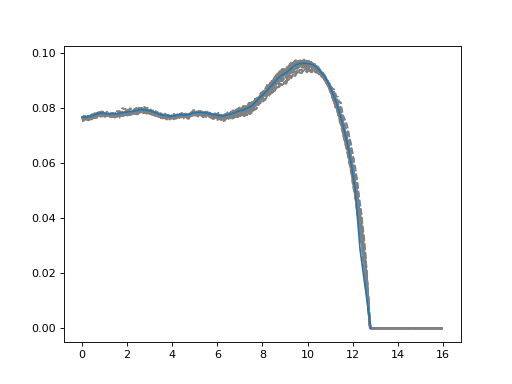
Examples
>>> import numpy as np
>>> from heavyedge import get_sample_path, ProfileData
>>> from heavyedge.wasserstein import wmean
>>> with ProfileData(get_sample_path("Prep-Type2.h5")) as data:
...     x = data.x()
...     Ys, Ls, _ = data[:]
>>> fs = Ys / np.trapezoid(Ys, x, axis=-1)[:, np.newaxis]
>>> f_mean, L = wmean(x, fs, Ls, np.linspace(0, 1, 100))
>>> import matplotlib.pyplot as plt
... plt.plot(x, fs.T, "--", color="gray")
... plt.plot(x[:L], f_mean[:L])
Segmented regression#
Broken line regression with two segments.
Deprecated since version 1.5: This module will be removed in HeavyEdge 2.0, as it is no longer required by public API.
Plugin API#
HeavyEdge provides the following entry points for plugins.
To list all installed plugins, run:
heavyedge --list-plugins
Command line extension#
Entry point group :
heavyedge.commandsObject : Module
Registers the subcommand to heavyedge command.
To register your own command, write a module which invokes heavyedge.cli.register_command()
and register it to this entry point.
All commands registered in the same entry point are grouped together when displayed by
help message. Define PLUGIN_ORDER attribute in the module to control the displaying
order.
To deprecate a command, use heavyedge.cli.deprecate_command() decorator.
- heavyedge.cli.register_command(name, desc)[source]#
Decorator to register the command class for the argument parser.
- Parameters:
- namestr
The unique name of the command.
- descstr
A short description of the command’s purpose.
See also
Examples
Decorate the class definition.
>>> from heavyedge.cli import Command, register_command
>>> @register_command("foo", "My command")
... class MyCommand(Command):
...     ...
- class heavyedge.cli.Command(name, logger)[source]#
Sub-command for CLI interface.
- Parameters:
- namestr
Name of the sub-command.
- loggerlogging.Logger
Logger to log the command run.
Examples
>>> class MyCommand(Command):
...     def add_parser(self, main_parser):
...         parser = main_parser.add_parser(self.name)
...         parser.add_argument("foo")
...     def run(self, args):
...         self.logger.info("Run my command")
...         print(args.foo)
- property name#
Name of the command for
add_parser().
- abstractmethod add_parser(main_parser)[source]#
Add the command parser to main parser.
- Parameters:
- main_parserargparse._SubParsersAction
Subparser constructor having
heavyedge.cli.ConfigArgumentParseras parser class.
- class heavyedge.cli.ConfigArgumentParser(*args, **kwargs)[source]#
Argument parser which can read config file.
Use
add_config_argument()to add an argument which can be read from the config file. When the first config argument is added, the--configoption is automatically added.Examples
>>> from heavyedge.cli import ConfigArgumentParser
>>> parser = ConfigArgumentParser("foo")
>>> _ = parser.add_config_argument("--bar")
>>> parser.print_help()
usage: foo [-h] [--config CONFIG] [--bar BAR]

options:
-h, --help       show this help message and exit
--config CONFIG  YAML file specifying config options.

config options:
--bar BAR
- heavyedge.cli.deprecate_command(version, use_instead)[source]#
Decorator to mark a command as deprecated.
Deprecated commands are still accessible, but are not displayed in the help message. Additionally, warning is raised when the command is used.
- Parameters:
- versionstr
Version when the command is deprecated.
- use_insteadstr
Other API which user should use.
Examples
Decorate the class definition.
>>> from heavyedge.cli import Command, register_command, deprecate_command
>>> @deprecate_command("1.5", "other command")
... @register_command("foo", "My command")
... class MyCommand(Command):
...     ...
Custom raw data type#
Entry point group :
heavyedge.rawdataObject : Subclass of
heavyedge.io.RawProfileBaseAffected commands :
heavyedge prep